 Lucas Noah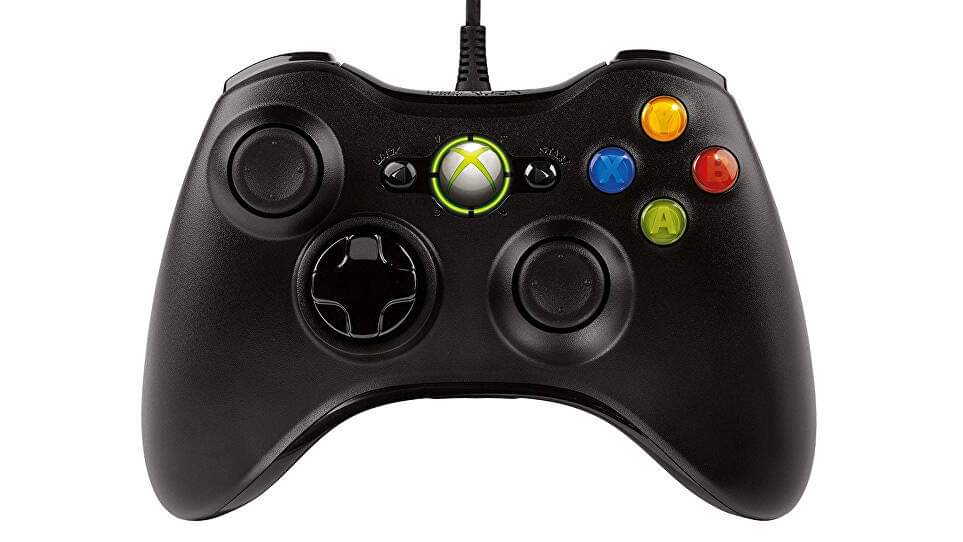
Top 3 Best Wired PC Game Controllers of 2022
Every good gamer knows that the PC is played with a mouse and a keyboard. However, for some games, such as car or adventure games, controllers are very useful. Today, let’s take a look at 3 models of PC controllers: the Xbox 360/PC wired controller, the EasySMX controller, and the Mad Giga controller.
1. GreensKon Xbox 360/PC
A “fake official version” PC controller, but just as effective
This Xbox 360/PC wired controller signed by GreensKon looks just like the “official” PC version sold by Microsoft. With this Xbox controller, you are sure to have no compatibility problem with your games or your machine. It has all the characteristics of a console controller: vibration, centralized button, 3 levels of “rumble control”… Note that this wired controller, with its 160/170 cm long cable, is perfect for playing on your computer. Robust, pleasant and ergonomic, it will be ideal for gamers with long sessions on the computer. Moreover, this PC controller is really cheap, an additional opportunity to enjoy it!
Pros:
- Price.
- Robustness.
- Ergonomics.
Cons
- An unofficial controller despite the identical design.
2. EasySMX
The low-cost wired PC controller with broad compatibility
The EasySMX wired controller is compatible with Windows PCs of course (all generations since Vista), but also with Android devices, the TV box and the PS3. It has a USB connector and is automatically activated once connected to the PC: “plug and play” in short. For the layout of the buttons and joysticks, this PC/PS3 controller is based on the model of those of Xbox. There are non-slip strips on the sides of the controller to ensure greater comfort during use. You have here a well-made product that will meet your expectations.
Pros
- Good ergonomics.
- A cheap PC controller.
- Compatibility.
Cons
- Accuracy sometimes leaves something to be desired.
3. Mad Giga
A PC controller with a long cable to play comfortably on your couch
The Mad Giga controller completes this comparison. This wired controller has the same design as the PlayStation controllers. Compatible with all versions of Windows since XP, this controller can also be used on Box TV and Android. Note that it is not usable on Xbox One and 360. The Mad Giga wired controller is equipped with a 2 meter long cable, which allows you to play on a PC as well as on a home console. Ideal for gamers or casual gamers, this controller is the cheapest of our comparison.
Pros
- A cheap PC controller.
- Cable a bit long.
- Many compatibilities.
Cons
- Very sensitive joystick.
- The R2 and L2 buttons do not handle progressive acceleration.
Summary
For a more relaxed way of playing on your computer, a controller is the way to go. PC controllers have similar technical characteristics, but their differences lie in their design. While some are closer to Xbox controllers, others opt for a design similar to that of PS4 models. The only thing that matters is your preference in this matter.
What you need to know about a PC controller:
Is it better to use an “official” Xbox controller or another model?
On their cover, some games recommend using the “official” Windows (and therefore Xbox) controllers. Using an “official” controller is a 99.9% guarantee that there will be no compatibility problems. However, you are free to choose among the wide range of “unofficial” controllers to satisfy your gaming desires. Compatibility should not be a problem.
Are there any compatibility issues with PC controllers?
The recent PC controllers and/or those presented in this comparison are logically compatible with your PC. In case of problems, you should check that all drivers are installed and/or updated. For games, if your computer recognizes the connected controller without any problem, from Fortnite to Call of Duty, L.A Noire or GTA, they are all compatible with PC controllers.
Wired or wireless controller, how to choose?
In terms of technical characteristics, there is no difference between a wired controller and a wireless controller. Technology now allows wireless controllers to perform as well as wired ones. However, the wired controller tends to reduce your ability to move. If you’re playing computer games on your living room TV, a wireless controller is the way to go. The real difference between wired and wireless controllers is the price: wireless controllers tend to be more expensive than wired ones.