 Audrey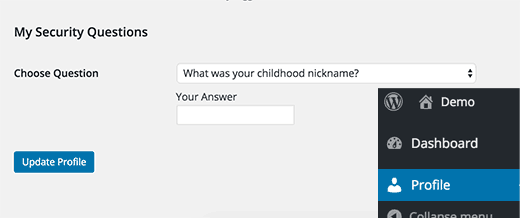
For identity verification, most financial institutions and large companies require you to add security questions to your account. What about WordPress? Is it possible to add security questions in WordPress for an additional security layer? The objective of this article is, to show how to add security questions to the WordPress login, registration, and reset password page.

Why Add Security Questions to Login & Registration Forms in WordPress?
There are multiple ways to protect the WordPress admin area from unauthorized access. If you run a WordPress membership site or a multi-user, then it is difficult to choose between security and user experience.
By adding security questions to your WordPress, then the site’s login screen acts as an additional password. Here there is a list of random questions. Hence, your users can choose one of the questions and after that add an answer to that question.
The advantage of adding security questions is, to avoid entering the hackers to a website using compromised passwords or email addresses. So this is a good easement for WordPress users.
Let’s see how you can easily add security questions to your WordPress site.
Improve WordPress Login Security by Adding Security Questions
To continue the process, first of all, you have to install and deactivate the WP Security Question plugin. We already published an article regarding this. So if you want more details, see how to install a WordPress plugin. It fully described the guide step by step.
Next, you have to visit the Setting ⇒ Security Question page to configure the plugin settings.
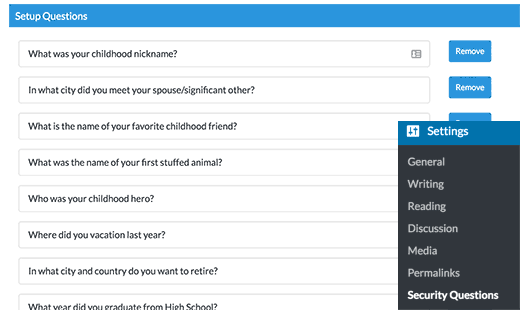
When you go through the Security Question page, You can see a list of security questions that have already set up. Further, if you liked to add your own security questions you can add them by clicking on the “Add more” button at the bottom. Not only that but also you can edit or remove the existing questions.
Next, scroll down to the bottom of the Settings page. Then you can see three screen pages; Login Screen, Registration Screen, and Forgot Password Screen. Now, you should enable all three options which ask security questions to log in, register, and lost passwords.
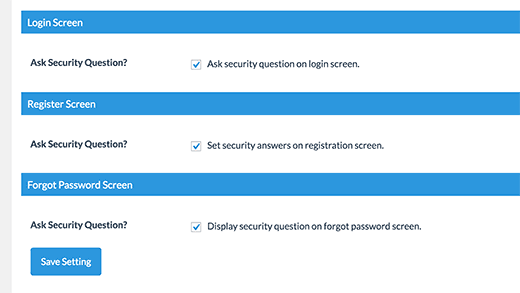
To store your changes, next click on the Save Setting button.
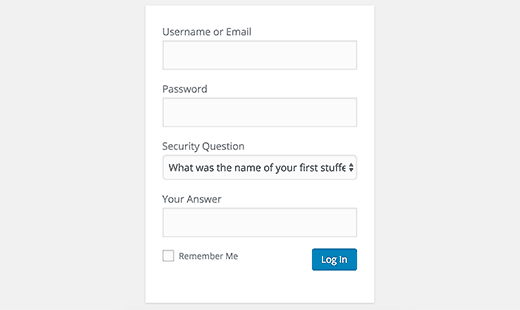
The process is over. Check your login page. The security question and answer text box will appear on the login page. From now on all users on your site will be asked to select and answer their security questions.
Users who are registered on your WordPress site can visit their Profile page to select a security question and to add the answer for it.
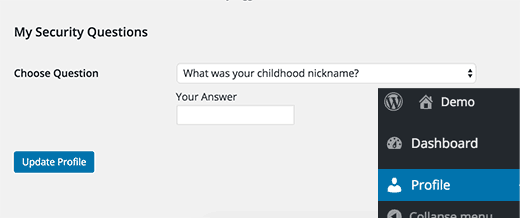
However, even if one of your registered users does not set a security question will still be able to login by just using their username/email and password.
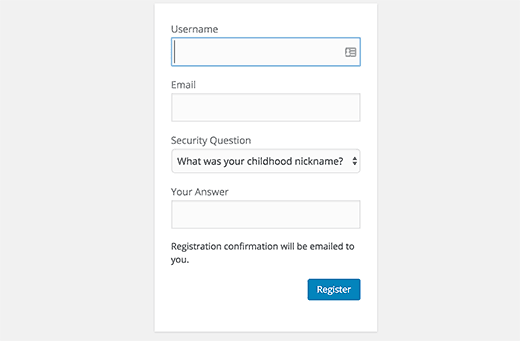
New users will be able to select a security question during registration if you enabled security questions on the registration page.
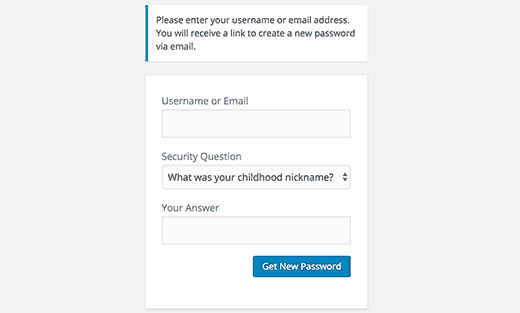
If you forgot the password you can easily reset it. Previously we said that enable the option security question on the forgot password page. Enabling this on the forgot password page, will ask users to answer their security questions to get the password reset email.
If the user’s email address is compromised, then this would stop someone from gaining access by resetting password.
At Trendyport, to protect our website from malicious attacks and login attempts we use Sucuri. Sucuri is a web security company that offers website monitoring and firewall services.
See how Sucuri helped us block 450,000 WordPress attacks in 3 months.
We hope this article worth for you to learn how to add security questions to your WordPress login screen. Additionally, you may also want to see our guide on how and why you should limit login attempts in WordPress.
If you have any questions please put a comment below. Further, you can find us on Twitter and Facebook.